

Table of Contents
- Do Smart Posture Correctors Actually Work for Desk Jobs?
- Smart Posture Trainer vs Traditional Brace: What's the Difference?
- How Long to Wear a Posture Corrector Without Causing Muscle Atrophy
- Ergonomic Desk Setup Tips That Make Correctors Work Harder
- Psychological Habit Formation: Why Cues Beat Willpower
- Long-Term Weaning: How to Stop Relying on a Corrector
- What to Look for Before You Buy
- Frequently Asked Questions
Last Updated: October 1, 2026
Do Smart Posture Correctors Actually Work for Desk Jobs?
Are smart posture correctors worth it for office workers? The honest answer is that they can be, but only as a training tool rather than a permanent fix. These devices use gentle vibration or haptic feedback to remind you to straighten up throughout the day.
The problem is that most office workers sit for eight or more hours, and the body adapts to whatever position it holds longest. A corrector can interrupt that pattern. It cannot undo it on its own. Below, we'll show you exactly how to use one without creating a new dependency.
CDC guidance on sedentary work and musculoskeletal health
Smart Posture Trainer vs Traditional Brace: What's the Difference?
A smart posture trainer is a wearable device that detects slouching and signals you to correct it, while a traditional brace physically holds your shoulders and spine in place. One teaches; the other supports.
How Passive Support Differs From Active Training
Passive support means the device does the work. A traditional brace pulls your shoulders back and holds them there. Your muscles learn nothing because they aren't being asked to engage.
Active training flips that. A smart trainer stays quiet when you're aligned and buzzes when you drift. Over time, that cue builds postural awareness and muscle memory.
The trade-off is real. Passive support gives instant relief but weakens the muscles you actually need. Active training feels slower and less dramatic, but it addresses the root cause.
How Long to Wear a Posture Corrector Without Causing Muscle Atrophy
Start with 20 to 30 minutes a day and build gradually over several weeks. Wearing a corrector for hours at a time can lead to muscle atrophy, where your core and back muscles weaken from disuse.
The mechanism is straightforward. Your postural muscles, the deep neck flexors, the lower trapezius, the spinal erectors, work on a use-it-or-lose-it basis. When an external device holds your shoulders back, those muscles stop receiving the load signal they need to stay strong. Remove the load for long enough and they decondition. That is why a brace worn eight hours a day can leave you slouching worse the moment you take it off.
The rule most guides get wrong is treating wear time as a badge of commitment. Longer isn't better. Short, consistent sessions train your nervous system; marathon sessions train nothing.
A practical progression looks like this:
- Week 1-2: 20-30 minutes daily, seated only, during a single focused block
- Week 3-4: 45-60 minutes, split into two sessions with a full break between
- Week 5-6: Use during focused desk blocks, then remove before lunch
- Week 7+: Wear only when you catch yourself slouching, or during your longest sitting stretch
Three signals tell you it's time to pull back:
- You feel slumped the moment the device comes off. That's a dependency signal, not a posture problem.
- Your upper back or neck aches after wear. The device is doing work your muscles should be doing.
- You stop noticing the cue. Habituation means the training value has dropped to zero.
If any of those show up, cut wear time by half and add two minutes of scapular retractions and chin tucks before each session. The goal is to make the device progressively less necessary, not more.
Ergonomic Desk Setup Tips That Make Correctors Work Harder
A corrector fights your environment. If your monitor sits too low or your chair is wrong, you're asking a small wearable to overcome bad ergonomics all day. Fix the setup and the device has far less to do.

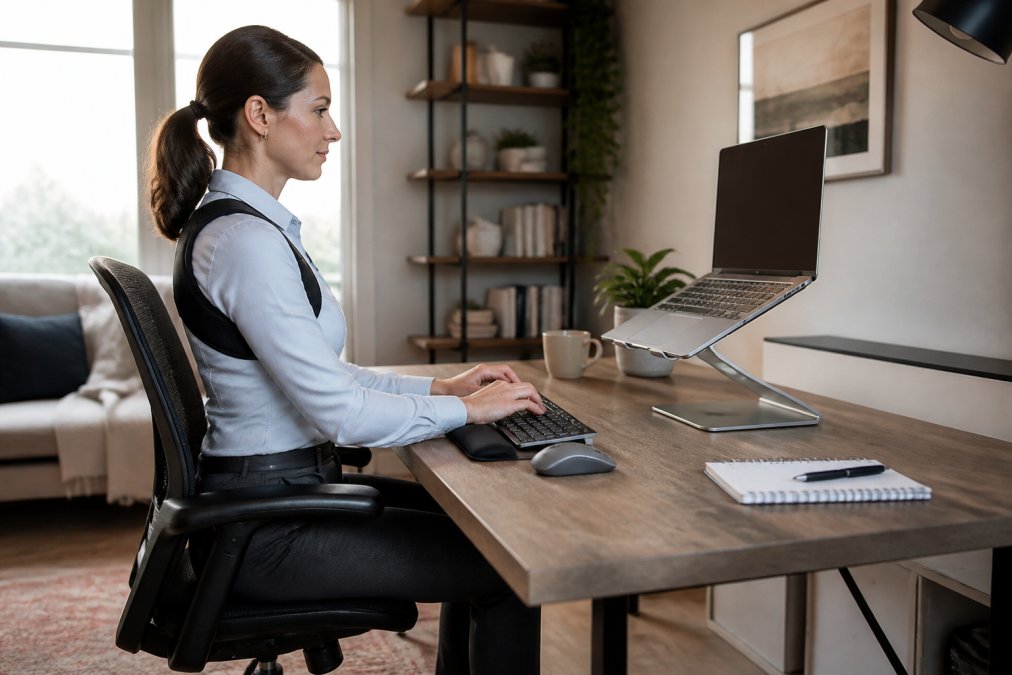
Start with these adjustments:
- Raise your monitor so the top edge sits at eye level
- Keep elbows at roughly 90 degrees with wrists flat
- Set chair height so feet rest flat on the floor
- Move the screen an arm's length away
- Take a standing or walking break every 30 to 45 minutes
The last point does more than any gadget. Movement resets the tissues that stiffen from static sitting. Pair that habit with a trainer and you're addressing both the cue and the cause.
OSHA computer workstation ergonomics guidance
Shapewear Panties with All Day Comfort →
Psychological Habit Formation: Why Cues Beat Willpower
Willpower runs out. A cue doesn't. This is the single biggest reason smart posture correctors outperform good intentions for desk workers.
Think about how you actually notice your posture. You don't. You notice it when your neck aches at 4 p.m., long after the damage is done. A haptic nudge collapses that delay. It catches the slouch in the moment, when correcting it costs nothing.
That immediate feedback loop is what builds a habit. Behavioral research on habit formation consistently shows that reminders tied to a specific action, delivered in real time, stick far better than abstract goals like "sit up straighter."
The catch is that the cue only works if you respond to it. Ignore the buzz ten times and your brain files it as background noise. Treat each signal as a two-second reset and the pattern starts to rewire itself.
Long-Term Weaning: How to Stop Relying on a Corrector
The goal was never to wear a device forever. Weaning means gradually reducing wear until your own postural awareness takes over.
Think of weaning as a handoff, not a stop. Your postural muscles have been partially unloaded for weeks. They need to pick the load back up in stages, the same way you'd return to running after time off.
A sensible taper looks like this:
- Week 1: Cut total wear time by about a quarter. Keep the same number of sessions, just shorter.
- Week 2: Drop to one session per day, reserved for your longest uninterrupted sitting block.
- Week 3: Wear it every other day. On off days, do a two-minute posture check at the top of each hour.
- Week 4: Use it only as a spot check, put it on for 15 minutes when you notice you're drifting, then take it off.
- Week 5+: Keep it in your bag as a backup, not a crutch. Reach for it on travel days, long flights, or deadline crunches.
Pair the taper with daily maintenance work so your muscles are actually getting stronger while the device steps back:
- Scapular retractions: 2 sets of 10, once a day
- Chin tucks: 2 sets of 10, once a day
- Doorway chest stretch: 30 seconds per side
- A standing or walking break every 30 to 45 minutes
If your posture holds without the buzz, you've done the job. If it collapses within an hour, you weaned too fast.
One more thing worth building into the taper: a weekly self-check. Stand against a wall, heels and shoulder blades touching, and notice how long you can hold that position comfortably. If that number is climbing month over month, the weaning is working. If it's flat or falling, your maintenance routine needs more attention than your device does.
What to Look for Before You Buy
The best device for most office workers is one that cues subtly, fits under clothing, and lets you control the intensity. Skip anything that forces your spine into a position you can't hold yourself.
Check these features before you commit:
| Feature | Why It Matters | What to Avoid |
|---|---|---|
| Feedback type | Vibration trains awareness | Constant rigid tension |
| Adjustability | Fits your body and desk | One-size straps |
| Wear time control | Prevents overuse | No session limits |
| Discreet design | Wearable under a blouse | Bulky external frames |
| Companion guidance | Builds a taper plan | No weaning support |
Cleveland Clinic overview of posture and back health
Frequently Asked Questions
Do posture correctors work for desk jobs?
They work as reminders, not fixes. A smart posture corrector vibrates when you slouch, which builds postural awareness during long desk sessions. That cue helps you reset your shoulders and thoracic spine throughout the day. But the correction itself comes from the muscles you engage each time you respond to the buzz. Pair the device with ergonomic desk setup tips and short movement breaks, and you get a habit-building tool rather than a permanent crutch.
Can smart posture correctors cause muscle atrophy?
Wearing one for hours every day can weaken the muscles you are trying to train, because passive support does the work your core and back muscles should do. Most physical therapists suggest 15 to 30 minutes at a time, a few sessions daily, and never overnight. The goal is neuromuscular re-education: short, frequent cues that teach your body what good alignment feels like, not all-day bracing that lets your muscles switch off.
How long should you wear a posture corrector per day?
Start with 15 minutes once or twice a day and build slowly. Many users cap sessions at 30 minutes, several times daily, especially in the first few weeks. If you feel stiffness, tingling, or your muscles feel weaker without it, cut back. The device should feel like a coach tapping your shoulder, not a brace holding you upright. A weaning schedule over eight to twelve weeks works better than indefinite daily wear.
What is a posture corrector that is suitable for office workers?
Look for a lightweight, low-profile smart trainer with haptic feedback you can wear under a blouse or shirt without visible bulk. Adjustable straps, breathable fabric, and a rechargeable battery that lasts a full workday matter more than extra sensors. If you want discreet support under professional clothing, TresAdore's Shapewear Panties with All Day Comfort ($34.95) include steel bones for lumbar support and a seamless finish, so they work alongside posture cues without adding bulk.
Sitting well is a skill, not a purchase, and the right tools only help if you use them with intention. At TresAdore, we curate wellness pieces designed to fit real routines, from supportive shapewear to recovery tools that earn their place in your day. Explore the collection and build a desk setup that supports you instead of fighting you.


